Operating EKS with AWS Q CLI
CloudNet 팀의 2026년 AWS EKS Workshop Study 4기 9주차 학습 내용을 담고 있습니다.
Operating EKS with Amazon Q CLI 워크샵을 정리하였습니다.
Amazon Q CLI는 Kiro CLI로 변경되었습니다. 워크샵 문서는 Amazon Q CLI 기준으로 작성되어 있으나, 이 글에서는 Kiro CLI로 실습을 진행하였습니다. Link
1. 개요
Kiro CLI는 자연어 프롬프트로 EKS 클러스터를 운영할 수 있는 AI 기반 CLI 도구입니다. MCP(Model Context Protocol) 서버와 연동하면 클러스터 정보 조회, 리소스 분석, 트러블슈팅을 자연어로 수행할 수 있습니다.
EKS 워크샵 내용을 따라 EKS MCP Server를 Kiro CLI에 연결하여 다음을 테스트합니다:
- 클러스터 세부 정보 조회
- Pod 스케줄링 실패(
Pending) 원인 분석 - 컨테이너 기동 실패(
CreateContainerConfigError) 원인 분석
2. Kiro CLI & MCP 서버 설치 및 설정
2.1 Kiro 설치
# Kiro 설치
curl -fsSL https://cli.kiro.dev/install | bash

# uvx 설치 (EKS MCP 서버 실행에 필요)
curl -LsSf https://astral.sh/uv/install.sh | sh
source ~/.zshrc

# 설치 확인
uvx --version
uvx란?
uvx는 Python 패키지를 전역 설치 없이 격리된 환경에서 실행하는 도구입니다.
Node.js의 npx와 유사하며, EKS MCP 서버는 uvx를 통해 실행됩니다.
2.2 EKS MCP 서버 설정
Kiro CLI 전역 설정 파일 경로: ~/.kiro/settings/mcp.json
mkdir -p ~/.kiro/settings
cat > ~/.kiro/settings/mcp.json << 'EOF'
{
  "mcpServers": {
    "awslabs.eks-mcp-server": {
      "command": "uvx",
      "args": [
        "--with",
        "mcp==1.18.0",
        "awslabs.eks-mcp-server@0.1.13",
        "--allow-write",
        "--allow-sensitive-data-access"
      ],
      "env": {
        "FASTMCP_LOG_LEVEL": "ERROR"
      },
      "autoApprove": [],
      "disabled": false
    }
  }
}
EOF
2.3 MCP 서버 확인
kiro-cli를 열고/tools명령어를 입력하면 아래 EKS MCP 서버를 확인할 수 있습니다.
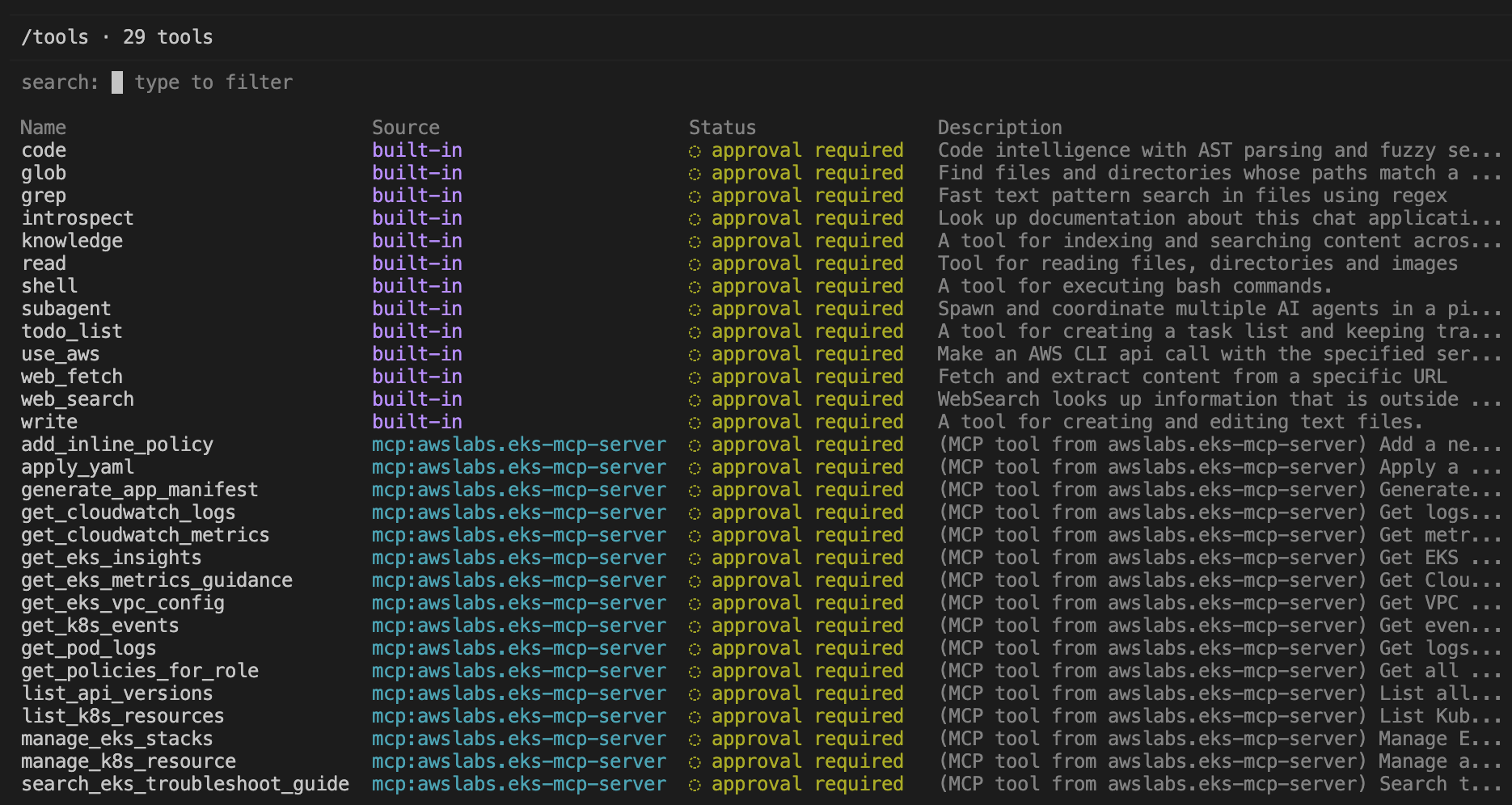
mcp:awslabs.eks-mcp-server 항목이 보이면 정상적으로 연결된 것이며, 주요 도구는 다음과 같습니다.
| 도구 | 설명 |
|---|---|
list_k8s_resources |
Kubernetes 리소스 목록 조회 |
manage_k8s_resource |
리소스 상세 조회/수정 |
get_k8s_events |
Pod/리소스 이벤트 조회 |
get_pod_logs |
Pod 로그 조회 |
get_eks_insights |
EKS Insights 조회 |
search_eks_troubleshoot_guide |
EKS 트러블슈팅 가이드 검색 |
모든 도구는 기본적으로 approval required 상태로, 작업 전에 사용자 승인을 요구합니다.
3. 클러스터 세부 정보 조회
3.1 클러스터 요약 정보
EKS 클러스터 요약 정보 생성 프롬프트 입력
─────────────────────────────────────────────────────────────────────────────────────────────────────────────────────────────────────
  Summarize the configuration of the siyoung-eks  EKS cluster in ap-southeast-1 region

● use_aws
    ╰ label=Describe siyoung-eks EKS cluster, service_name=eks, operation_name=describe-cluster, region=ap-southeast-1
● use_aws
    ╰ label=List node groups for siyoung-eks, service_name=eks, operation_name=list-nodegroups, region=ap-southeast-1
    {
      "exit_status": "0",
      "stdout": "{\n    \"nodegroups\": []\n}\n",
    ...+2 lines (ctrl+o to toggle)

  Here's a summary of the siyoung-eks cluster configuration:

  General

  - Region: ap-southeast-1 (Singapore)
  - Kubernetes version: 1.35
  - Platform version: eks.13
  - Status: ACTIVE
  - Created: 2026-05-17
  - Tags: Environment=cloudneta-lab, Terraform=true

  Networking

  - VPC: vpc-0d9353d9b7c65bd4e
  - Subnets: 3 subnets across the VPC
  - Service CIDR: 172.20.0.0/16 (IPv4)
  - Endpoint access: Both public (0.0.0.0/0) and private enabled

  Compute (EKS Auto Mode)

  - Auto Mode: enabled with node pools general-purpose and system
  - No managed node groups (Auto Mode handles compute)
  - Block storage: enabled
  - Elastic Load Balancing: enabled
  - Control plane scaling tier: standard

  Security

  - Authentication: API_AND_CONFIG_MAP
  - Secrets encryption: KMS key d72ff1c2-2c99-434b-8ecb-f48fd72bc4c5
  - OIDC issuer configured
  - Deletion protection: disabled

  Logging

  - All control plane log types enabled: api, audit, authenticator, controllerManager, scheduler

  Support

  - Upgrade policy: EXTENDED support

▸ Credits: 0.21 • Time: 12s
클러스터 요약 정보를 요청하는 프롬프트에서는 Kiro CLI가 EKS MCP 서버의 도구가 아닌 Kiro CLI 내장 use_aws 도구가 사용하였습니다. EKS MCP 서버는 Kubernetes API 수준의 리소스 조회에 특화되어 있고, AWS API 수준의 조회(describe-cluster 등)는 내장 도구가 담당합니다.
3.2 Pod 목록 및 네트워크 정보 조회
Default 네임스페이스의 파드와 각 파드의 IP/호스트네임 목록 요청 프롬프트
  List all pods in the default namespace with their IP addresses along with the host names
  they are running on.

● list_k8s_resources
    ╰ cluster_name=siyoung-eks, kind=Pod, api_version=v1, namespace=default
   NAME                                  READY   STATUS    RESTARTS   AGE     IP
    NODE                  NOMINATED NODE   READINESS GATES
    nginx-automode-test-6c9c6f495-9qx6f   1/1     Running   0          5h26m
    10.77.22.80   i-0c995e29805b4388f   <none>           <none>
    nginx-automode-test-6c9c6f495-gnrwr   1/1     Running   0          5h26m
    10.77.22.81   i-0c995e29805b4388f   <none>           <none>
    nginx-automode-test-6c9c6f495-zznd2   1/1     Running   0          5h26m
    10.77.22.82   i-0c995e29805b4388f   <none>           <none>


  Here are the pods in the default namespace:

  ┌─────────────────────────────────────┬─────────────┬─────────────────────┐
  │ Pod                                 │ IP          │ Node (Host)         │
  ├─────────────────────────────────────┼─────────────┼─────────────────────┤
  │ nginx-automode-test-6c9c6f495-9qx6f │ 10.77.22.80 │ i-0c995e29805b4388f │
  ├─────────────────────────────────────┼─────────────┼─────────────────────┤
  │ nginx-automode-test-6c9c6f495-gnrwr │ 10.77.22.81 │ i-0c995e29805b4388f │
  ├─────────────────────────────────────┼─────────────┼─────────────────────┤
  │ nginx-automode-test-6c9c6f495-zznd2 │ 10.77.22.82 │ i-0c995e29805b4388f │
  └─────────────────────────────────────┴─────────────┴─────────────────────┘

  All 3 pods are part of the nginx-automode-test deployment, all running on the same
  node (i-0c995e29805b4388f), and all in Running status.
list_k8s_resources 가 호출된 것을 볼 수 있습니다. 이 Tool은 EKS MCP 서버가 제공하는 것으로, kubectl get pods -o wide와 동일한 정보를 자연어 요청으로 조회할 수 있습니다.
4. 트러블슈팅 테스트 1 - PVC 누락으로 인한 Pending
4.1 시나리오
존재하지 않는 PVC를 마운트하는 Pod를 배포하여 스케줄링 실패를 재현합니다.
cat << 'EOF' | kubectl apply -f -
apiVersion: v1
kind: Pod
metadata:
  name: failing-pod
  namespace: default
  labels:
    app: volume-demo
spec:
  containers:
  - name: main-container
    image: busybox:1.37.0-glibc
    command: ["sleep", "3600"]
    resources:
      requests:
        cpu: 100m
        memory: 128Mi
      limits:
        cpu: 200m
        memory: 256Mi
    volumeMounts:
    - name: persistent-storage
      mountPath: /data
  volumes:
  - name: persistent-storage
    persistentVolumeClaim:
      claimName: my-pvc
  restartPolicy: Always
  serviceAccountName: default
EOF
- Pending 상태 확인
kubectl get pods -n default

NAME                                  READY   STATUS    RESTARTS   AGE
failing-pod                           0/1     Pending   0          115s
nginx-automode-test-6c9c6f495-9qx6f   1/1     Running   0          5h38m
nginx-automode-test-6c9c6f495-gnrwr   1/1     Running   0          5h38m
nginx-automode-test-6c9c6f495-zznd2   1/1     Running   0          5h38m
4.2 Kiro CLI 원인 분석
Pending Pod 트러블슈팅 프롬프트 실행 결과
I have a pod stuck in a pending state in my siyoung-eks cluster in ap-southeast-1.
  Find the cause of the failure and provide me with a summary of the approach to solve
  it.

● list_k8s_resources
    ╰ cluster_name=siyoung-eks, kind=Pod, api_version=v1

  The suspect is failing-pod. It mounts a PVC called my-pvc. Let me check the pod events
  and the PVC status simultaneously.
● get_k8s_events
    ╰ cluster_name=siyoung-eks, kind=Pod, name=failing-pod, namespace=default
● list_k8s_resources
    ╰ cluster_name=siyoung-eks, kind=PersistentVolumeClaim, api_version=v1,
    namespace=default
    {
      "content": [
        {
    ...+24 lines (ctrl+o to toggle)

  Root cause is clear.

  ──────────────────────────────────────────────────────────────────────────────────────

  Root Cause

  failing-pod is stuck in Pending because it references a PersistentVolumeClaim named
  my-pvc that does not exist in the default namespace. The scheduler cannot place the
  pod until the PVC is present and bound.

  FailedScheduling: PersistentVolumeClaim "my-pvc" not found

    "text": "Successfully listed 0 PersistentVolumeClaim resources in default/all
    namespaces",
            "annotations": null,
            "_meta": null
          }
        ],
        "structuredContent": null,
        "isError": false,
        "kind": "PersistentVolumeClaim",
        "api_version": "v1",
        "namespace": "default",
        "count": 0,
        "items": []
      },
      "isError": false
    }

  Root cause is clear.

  ──────────────────────────────────────────────────────────────────────────────────────

  Root Cause

  failing-pod is stuck in Pending because it references a PersistentVolumeClaim named
  my-pvc that does not exist in the default namespace. The scheduler cannot place the
  pod until the PVC is present and bound.

  FailedScheduling: PersistentVolumeClaim "my-pvc" not found

  ──────────────────────────────────────────────────────────────────────────────────────

  How to fix it

  You need to create the missing PVC before the pod can be scheduled. The approach
  depends on your storage needs:

  1. Create the PVC — Define a PVC named my-pvc in the default namespace with an
  appropriate StorageClass and access mode. For EKS Auto Mode, the ebs.csi.aws.com
   provisioner with ReadWriteOnce is the typical choice:

  apiVersion: v1
  kind: PersistentVolumeClaim
  metadata:
    name: my-pvc
    namespace: default
  spec:
    accessModes:
      - ReadWriteOnce
    storageClassName: gp2  # or your cluster's default StorageClass
    resources:
      requests:
        storage: 1Gi       # adjust to your needs

  2. Verify the StorageClass exists — Run kubectl get storageclass to confirm which
  StorageClasses are available in your cluster and pick the right one.
  3. Apply and wait for binding — Once the PVC is created, the dynamic provisioner will
  create the underlying EBS volume and bind the PVC. The scheduler will then place
  failing-pod automatically — no pod restart needed.

  Want me to create the PVC for you? If so, let me know the desired storage size and
  StorageClass (or I can check what's available in the cluster).

▸ Credits: 0.31 • Time: 24s
Kiro CLI가 list_k8s_resources → get_k8s_events → list_k8s_resources(PVC) 순서로 EKS MCP Server Tool을 호출하며 원인을 추적했습니다.
5. 트러블슈팅 테스트 2 - ConfigMap 누락으로 인한 CreateContainerConfigError
5.1 시나리오
존재하지 않는 ConfigMap을 envFrom으로 참조하는 Pod를 배포하여 컨테이너 기동 실패를 재현합니다.
cat << 'EOF' | kubectl apply -f -
apiVersion: v1
kind: Pod
metadata:
  name: crashloop-pod
  namespace: default
spec:
  containers:
  - name: app
    image: busybox:1.37.0-glibc
    command: ["sh", "-c", "echo $DB_HOST && sleep 3600"]
    envFrom:
    - configMapRef:
        name: app-config
  restartPolicy: Always
EOF
- 상태 확인
5.2 Kiro CLI 원인 분석
CreateContainerConfigError 트러블슈팅 프롬프트 실행 결과
────────────────────────────────────────────────────────────────────────────────────────────────────────────────────────────────────
  I have a pod called crashloop-pod in the default namespace
  of siyoung-eks cluster in ap-southeast-1 that is failing to start.
  Troubleshoot the issue and tell me how to fix it.

● get_k8s_events
    ╰ cluster_name=siyoung-eks, kind=Pod, name=crashloop-pod, namespace=default
● manage_k8s_resource
    ╰ operation=read, cluster_name=siyoung-eks, kind=Pod, api_version=v1

  Root cause: missing ConfigMap app-config

  The pod is stuck in CreateContainerConfigError — not actually crashing in a loop, but failing to start. The container uses envFrom
   to load all env vars from a ConfigMap named app-config, but that ConfigMap doesn't exist in the default namespace.

  Fix: Create the missing ConfigMap. Based on the pod's command (echo $DB_HOST), it expects at least a DB_HOST key. Create it with
  the appropriate value:

  apiVersion: v1
  kind: ConfigMap
  metadata:
    name: app-config
    namespace: default
  data:
    DB_HOST: <your-database-host>

  Apply it:

  kubectl apply -f app-config.yaml

  Once the ConfigMap exists, the kubelet will automatically retry and the pod will start — no pod restart needed. If you don't know
  the exact keys the app needs, start with DB_HOST (the only one referenced in the command) and add others as required.
Kiro CLI가 아래와 같은 과정으로 트러블슈팅을 진행하였습니다.
get_k8s_events→manage_k8s_resource순서로 이벤트 확인 후 Pod 스펙 분석CreateContainerConfigError와CrashLoopBackOff를 구분하고, ConfigMap 생성 시 kubelet이 자동으로 재시도하며 Pod가 기동된다는 동작 방식 설명